
26 tool calls, one script, $0.02: measuring “code mode”.
Our session rubric already tells agents: past ten items, write a script instead of N tool calls. We measured what that's worth on one production job, and where the savings stop.
Updated October 10, 2026 · The first version of this post drew deserved criticism on Hacker News. The prose was machine-drafted and read like it, and it said “we didn't estimate this” two paragraphs before a section full of estimates. This is a rewrite. The measurements are unchanged, the labels on them are now accurate, and we added the end-to-end production numbers the original left out.
What is Code Mode for MCP?
Code Mode is a pattern for connecting a model to MCP tools: instead of calling tools one at a time, the model writes a short program against a typed API generated from those tools, the program runs in a sandbox, and only its returned value goes back into the model's context.
Our modeled baseline uses sequential raw calls and retains their full JSON results in context. Actual harnesses can batch tool calls, discover schemas, prune results, or compact history. Those choices change the comparison.
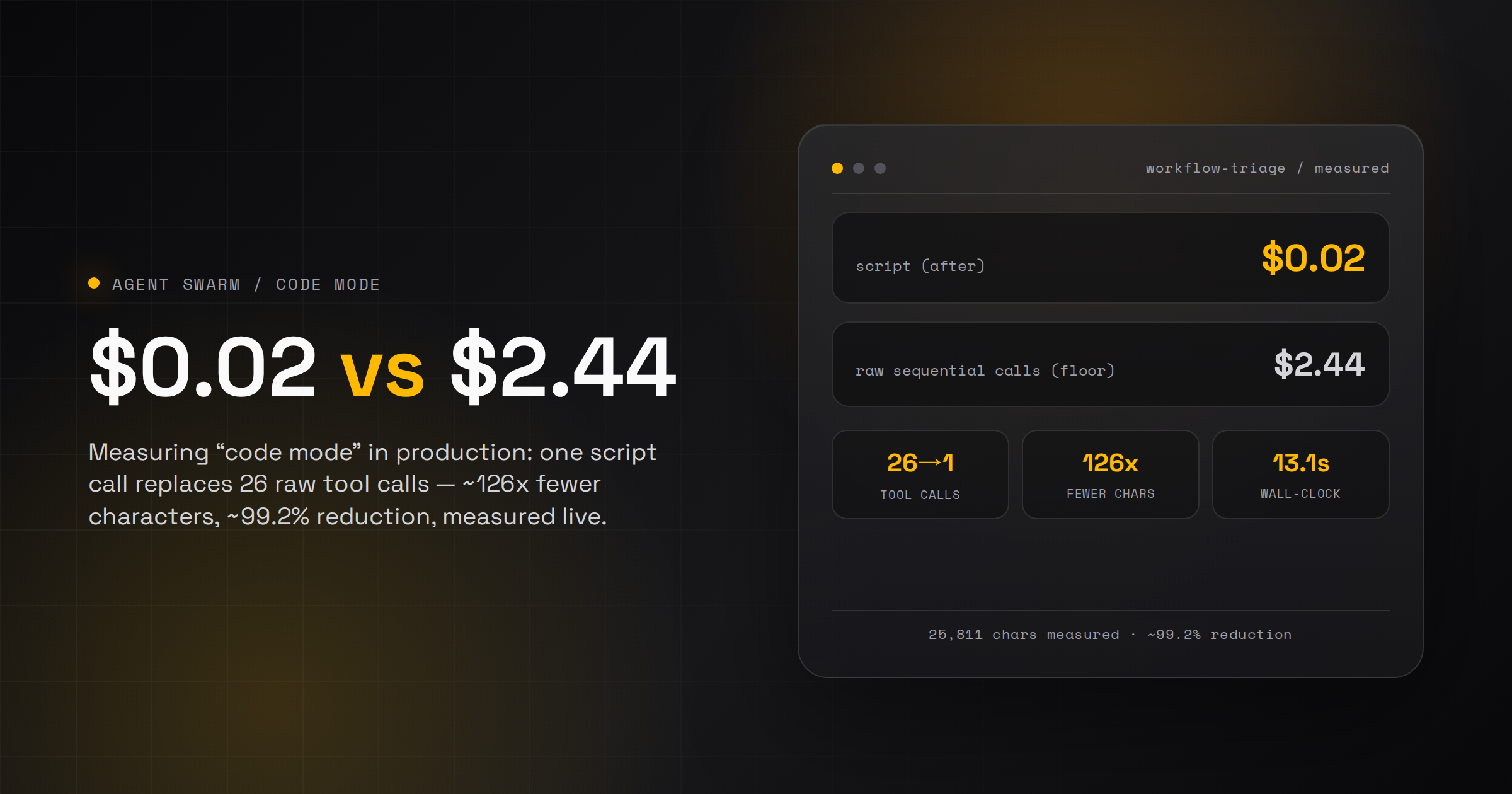
We measured the difference on one production job: 26 underlying calls became one script call, and about 99.2% fewer characters entered context for that data-gathering step (modeled raw path vs measured script run — the labels matter and we keep them throughout). The roughly 50% figure you will see later is the end-to-end cost of the recurring job that uses the script, which is the number we actually bank.
In November, Anthropic published a piece on code execution with MCP: give an agent a sandbox and a generated API instead of raw tool calls, and a task that cost 150,000 tokens costs 2,000, because intermediate data never passes through the model's context. Cloudflare shipped the same idea in September as “Code Mode,” and later put a number on it: 2,500+ API endpoints, 1.17M tokens down to about 1,000.
None of that is a new idea. “If you do the same thing twice, write a script” predates LLMs by half a century. Agent Swarm sessions have shipped a version of it as a rubric for a while: past roughly ten items, or any bulk fan-out, the agent is told to write a script instead of making individual tool calls. It's the same machinery behind Script Workflows, and nothing in this post was built for the post.
What we hadn't done was measure it. So we picked one real job, ran the script path live, and modeled what the tool-call path would have put in front of the model. One number in this post is measured end to end, one is modeled from measured samples, and the difference is labeled everywhere it appears.
When Code Mode helps, and when raw tool calls are simpler
There are three ways to wire a model to tools, and the right one depends on how many calls the job makes and who needs to see each result.
| Approach | What enters the model's context | When it helps | When it is the wrong choice |
|---|---|---|---|
| Raw MCP tool calls | Our modeled baseline includes schemas and retains raw results. Discovery, batching, output limits, and compaction can reduce that payload. | One to three calls; each result needs the model's judgment before the next call; a human must approve each call individually; irreversible writes. | Bulk fan-out, loops over many items, or large payloads you would filter down anyway. |
| Single code tool (Cloudflare's pattern): one tool that accepts code written against a typed API built from the server's tools | The code tool's schema and the typed API; only the program's return value re-enters context. | Many sequential calls whose intermediate data the model does not need to read; filtering and joining large payloads; loops. | Steps that need judgment between calls, per-call human approval, or irreversible writes. |
| Search-and-execute (Cloudflare's pattern for very large APIs): a search tool finds the relevant endpoints, then an execute tool runs code against them | The search and execute schemas; endpoint definitions are discovered on demand. Cloudflare reports 2,500+ endpoints going from 1.17M tokens to about 1,000. | APIs too large to describe in a prompt at all. | Small tool catalogs where the whole typed API fits up front; the discovery step is overhead you do not need. |
Our own rubric, which ships in every Agent Swarm session template: past roughly ten items, or any bulk fan-out, write a script. Below that threshold, or whenever a step needs the model's judgment or a human's approval before the next one, stay with raw calls. Cloudflare documents both server patterns in its Code Mode MCP server patterns guide. If your stack is Python, FastMCP's Code Mode is the equivalent option: the model writes Python that orchestrates tools in a sandbox, with staged tool discovery.
What the script does
workflow-triage scans every automation the swarm runs (all workflows and all cron schedules) and flags which ones are dead, failing, or fine. Under the hood that's 26 calls: one workflow_list, one schedule_list, and one workflow_listRuns per workflow (24 of them). An agent doing this with individual tool calls would make all 26, and every raw JSON payload would sit in its context for the rest of the conversation.
The script makes the same 26 calls inside a sandboxed subprocess. Only the final summary object reaches the agent.
The numbers
The script column comes off a live run. The raw-path column is modeled: we ran the same underlying calls on a sample and extrapolated to the full catalog (24 workflows, 60 schedules). The arithmetic is in the next section.
| Script (measured) | Raw tool calls (modeled) | |
|---|---|---|
| Agent-facing calls | 1 | 26 |
| Reaches the agent's context | 25,811 characters (one JSON result) | ~3.26M characters |
| Approx. tokens (chars ÷ 4) | ~6,450 | ~815,000 |
| Wall-clock | 13.12s (durationMs: 13120) | ~2–6.5 min (26 sequential turns) |
| Input cost at an assumed $3/M tokens | ~$0.02 | ~$2.44, one uncached read |
| Reduction | – | ~126x fewer characters entering context (~99.2%) |
To be clear about what that last row claims: 99.2% is the reduction in characters put in front of the model for this one data-gathering step, script versus tool calls. It is not the change in our bill. The end-to-end effect on the real scheduled task is further down, and it's smaller.
What's measured, what's modeled
- Measured: the script's side.
durationMs: 13120and the 25,811-character result came off a liveworkflow-triagerun. - Modeled from samples: the raw-path character count. We called the same underlying SDK methods directly, outside the script:
workflow_list({})returned 16,304 characters andschedule_list({})returned 72,105. Forworkflow_listRunswe sampled 4 of the 24 workflows, from smallest to largest: 6, 26, 53, and 227 runs, totalling 1,075,430 characters over 312 runs, an average of 3,447 characters per run. The script itself recorded 920 total runs across all 24 workflows, so 920 × 3,447 plus the two list calls gives ~3.26M characters. - Why we sampled instead of running all 26 calls: running the full raw path means pulling ~3.2M characters of JSON into a live context. We sampled a third of the runs (including the largest workflow) and extrapolated. If you think that weakens the number, that's fair. It's why every appearance of it is labeled modeled.
- A bug we found on the way: the
limit: 25we pass toworkflow_listRunsdoesn't cap the result: it returned all 227 runs for our busiest workflow. The estimate therefore describes the observed uncapped responses. A working limit would reduce raw payloads. This behavior does not establish whether our sample extrapolates high or low. - The $2.44 prices one uncached read: we apply the assumed input rate once to the estimated payload. Repeated uncached reads would add cost. Caching, output limits, and compaction can reduce billed input. We did not measure the full raw-call run or its bill.
What it changes end to end
The honest headline is not 99.2%. The schedule that runs this triage daily is the end-to-end picture: after the data-gathering moved into the script, run time went from around 5 minutes to 1–2 minutes, and per-run cost dropped by roughly half.
Why half and not 99%? Because the script only compresses the mechanical middle of the task. The agent still reads the summary, reasons about which flagged workflow actually matters, and decides what to escalate. In practice the run ends with a Slack ping telling us what to go check. That reasoning is most of what's left of the cost, and it's the part we want a model doing. Scripts don't remove the thinking at either end of a task; they stop the model from paying to page through raw JSON in between.
Since this measurement we've leaned in hard. As of late July the swarm runs about 150 reusable scripts, with ~25,000 script executions over the last 30 days, and roughly 70% of our schedules now use at least one. The roughly 50% reduction describes the measured triage job. We did not establish that reduction across the full script catalog.
The code that does it
This is an abbreviated script (id da3b5c7b-b9a6-4f9e-be9e-f682aca48ea0, global scope in our deployment). Two of our agents wrote it. The excerpt omits report construction, so it is not a standalone executable example.
// workflow-triage — read-only health scan of all workflows + schedules.
// Returns per-item run stats + DEAD/FAILING/OK flags + a markdown report of flagged items.
export default async function (args: any, ctx: any) {
  const runLimit = args?.runLimit ?? 25;
  const staleDays = args?.staleDays ?? 14;
  const includeSchedules = args?.includeSchedules ?? true;
  const now = Date.now();
  const dayMs = 86400000;
  const isFail = (s: string) => /fail|error|halt|timeout|abort/i.test(String(s || ""));

  // ---- Workflows: run stats require workflow_listRuns (no lastRunAt on the row) ----
  const wl = await ctx.swarm.workflow_list({});
  const wfs: any[] = wl?.data ?? [];
  const rows: any[] = [];
  const pool = 6; // small concurrency to avoid hammering
  for (let i = 0; i < wfs.length; i += pool) {
    const batch = wfs.slice(i, i + pool);
    const res = await Promise.all(batch.map(async (w: any) => {
      let runs: any[] = [];
      try { const rr = await ctx.swarm.workflow_listRuns({ workflowId: w.id, limit: runLimit }); runs = rr?.data ?? []; }
      catch { runs = []; }
      const total = runs.length;
      const failed = runs.filter((r: any) => isFail(r.status)).length;
      const stamps = runs.map((r: any) => Date.parse(r.startedAt || r.createdAt || r.finishedAt || "")).filter((n: number) => !isNaN(n));
      const lastRun = stamps.length ? Math.max(...stamps) : null;
      const daysSince = lastRun ? Math.round((now - lastRun) / dayMs * 10) / 10 : null;
      const failRatio = total ? Math.round(failed / total * 100) / 100 : 0;
      const dead = !w.enabled || total === 0 || (lastRun != null && daysSince! > staleDays);
      const failing = total >= 2 && failRatio >= 0.5;
      return {
        kind: "workflow", id: w.id, name: w.name, enabled: w.enabled,
        runs: total, failed, failRatio,
        lastRunAt: lastRun ? new Date(lastRun).toISOString() : null,
        daysSinceLastRun: daysSince, nodeCount: w.nodeCount,
        flag: failing ? "FAILING" : dead ? "DEAD" : "OK",
      };
    }));
    rows.push(...res);
  }

  // ---- Schedules: lastRunAt + consecutiveErrors already on the row ----
  const scRows: any[] = [];
  if (includeSchedules) {
    const sl = await ctx.swarm.schedule_list({});
    const scs: any[] = sl?.data?.schedules ?? [];
    for (const s of scs) {
      const lastRun = s.lastRunAt ? Date.parse(s.lastRunAt) : null;
      const daysSince = lastRun ? Math.round((now - lastRun) / dayMs * 10) / 10 : null;
      const dead = !s.enabled || (!lastRun) || (daysSince != null && daysSince > staleDays);
      const failing = (s.consecutiveErrors ?? 0) >= 3;
      scRows.push({
        kind: "schedule", id: s.id, name: s.name, enabled: s.enabled,
        consecutiveErrors: s.consecutiveErrors ?? 0,
        lastRunAt: s.lastRunAt ?? null, daysSinceLastRun: daysSince,
        nextRunAt: s.nextRunAt ?? null, cron: s.cronExpression,
        flag: failing ? "FAILING" : dead ? "DEAD" : "OK",
      });
    }
  }

  const rank = (f: string) => f === "FAILING" ? 0 : f === "DEAD" ? 1 : 2;
  rows.sort((a, b) => rank(a.flag) - rank(b.flag) || (b.failRatio - a.failRatio));
  scRows.sort((a, b) => rank(a.flag) - rank(b.flag) || (b.consecutiveErrors - a.consecutiveErrors));

  const sum = (arr: any[]) => ({
    total: arr.length,
    failing: arr.filter(r => r.flag === "FAILING").length,
    dead: arr.filter(r => r.flag === "DEAD").length,
    ok: arr.filter(r => r.flag === "OK").length,
  });

  // markdown report of only the flagged (non-OK) items
  const flaggedW = rows.filter(r => r.flag !== "OK");
  const flaggedS = scRows.filter(r => r.flag !== "OK");
  let report = `## Workflow triage — flagged\n`;
  report += `Workflows: ${sum(rows).failing} failing / ${sum(rows).dead} dead / ${sum(rows).ok} ok (of ${rows.length})\n`;
  // ... table-building omitted here for length; full source has per-row markdown
  //     tables for both workflows and schedules — see the script catalog entry.

  return {
    params: { runLimit, staleDays, includeSchedules },
    workflows: { summary: sum(rows), rows },
    schedules: includeSchedules ? { summary: sum(scRows), rows: scRows } : null,
    report,
  };
}
There's no framework here. It's a for loop with a concurrency pool of 6, some Date.parse, and a sort. The only thing that makes it “code mode” rather than 26 tool calls is where it runs. Every workflow_listRuns payload lands in the loop variable runs and stays there; the agent sees only the return at the bottom.
“Intermediate results stay in the execution environment by default... the agent only sees what you explicitly log or return.” Anthropic, Code execution with MCP
workflow-triage, one script call vs. 26 raw tool calls
The script puts ~0.79% of the raw path's tokens in front of the model
Each bar is a share of the modeled raw-tool-call path (~815,000 tokens, extrapolated from measured samples; arithmetic in the methodology section above). The ratio holds at any model's $/token rate.
The security boundary
Moving work from tool calls into generated code changes what you trust. Five properties decide whether that trade is safe.
Sandboxing
Scripts run in a separate Bun subprocess with the environment stripped to a small allowlist. Filesystem modules do not exist in the sandbox, scripts cannot shell out, and a run is killed after about 30 seconds with stdout capped at 1 MB. The full surface is documented in the scripts runtime guide.
Authorization
A script's ctx exposes only an allowlist of SDK methods, not arbitrary APIs. Scripts-only mode can hide the direct tool list entirely, so agents go through scripts for every swarm operation. Role-scoped ctx is not shipped: we're building role-based permissions so a script only exposes the tools that agent's role is allowed to touch.
Credential handling
Secrets never appear in script source, arguments, or logs. The credential broker attaches them server-side at egress, and only for allowlisted hosts: a script sends a placeholder, and the runtime swaps in the real value only when the destination host is on the list. Only lead agents manage bindings.
Approval granularity
You lose per-call approvals. One script that hits ten tools is coarser to gate than ten separate calls a human can approve one by one — that objection from the HN thread is true. Our answer is moving the boundary from calls to capabilities: the sandbox, the SDK allowlist, and the credential broker above are what you gate. Gating the surface instead of the call is a different security model, not a free upgrade.
Unverified generated code
The other HN objection: a one-off script the model writes into a REPL has to be trusted fresh every run, which is a bad deal for anything that mutates state. That is why the unit we care about is the saved script: written once, reviewed once, visible in a dashboard, and re-run many times. The economics of “review it once” only work when the script is durable, and mutating jobs should not run as ad-hoc code.
Implementation checklist
If you are building Code Mode into your own agent setup, this is the order we would do it in:
- Start from a repeated fan-out job, not a one-off. The savings only compound if the job runs often.
- Generate a typed API from your tools, so the model writes code against types instead of raw JSON schemas.
- Run the code in a sandbox: no filesystem, a wall-clock timeout, and a cap on output size.
- Return a small summary object, not raw payloads. The return value is the only thing that re-enters the model's context.
- Keep secrets out of the sandbox and inject them at egress, per destination host.
- Save and review the scripts you re-run. A reviewed, durable script is the unit of trust, not the one-off generation.
- Keep raw tool calls for steps that need the model's judgment between calls, or per-call human approval.
- Measure before and after, and label what was measured and what was modeled.
Takeaway
The script-over-tool-calls rubric already ships in every session template, so for us the question was never whether to adopt Code Mode. The measurement made the rubric sharper: 26 calls became one, 13 seconds, about two cents to read the result, and roughly half the cost of the daily job that uses it. The implementation matters less than the properties: typed, sandboxed, reusable, and honest about what was measured and what was modeled.
/ references
Sources and further reading
Related field notes
TasteLabs Found Design Drift in Our Own Sites
Our landing sites had three amber ramps, 34 untokenized brand-color literals, and no BRAND.md files. One fix PR has merged; one is still open.
25 MIT-licensed open-source projects worth tracking for agent infrastructure
25 MIT-licensed agent-infrastructure repos with outsized, rising attention among 655 agent-swarm stargazers. Stars and activity checked 2026-10-10.
Two small models triage every PR
Clairic and Jev triage every pull request, and a coding agent reviews only what they flag. About $0.02 and 30 seconds per PR, across 14 real PRs.